
Updated Date:
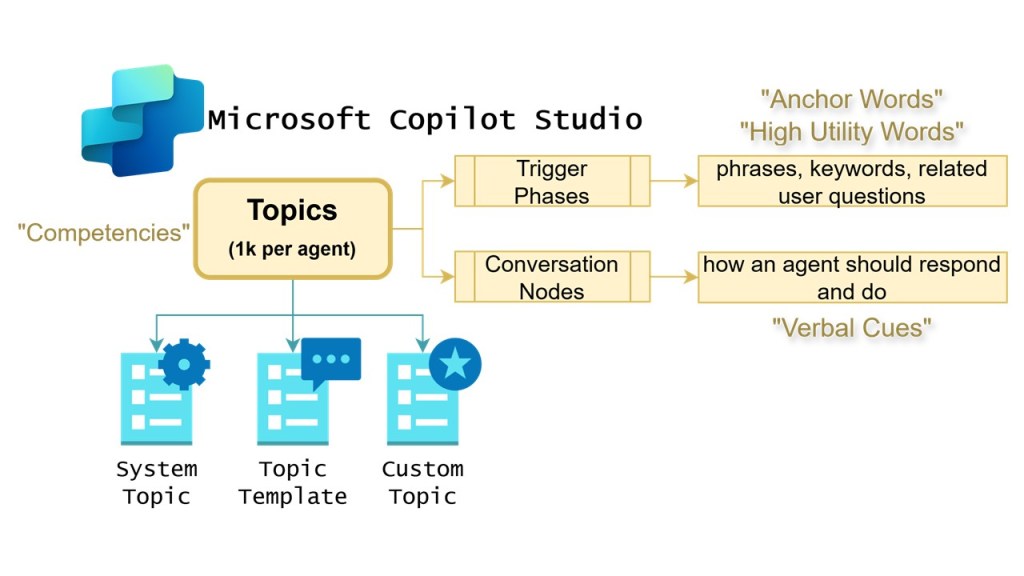
When I first wrote about topics in Microsoft Copilot Studio, I described three ideas: anchor words, high-utility words, and verbal cues. The idea behind them still holds. The language you give an agent decides whether it picks the right topic at the right time. But the platform has changed a lot since then, and I want to connect those ideas to how Copilot Studio actually works today.
First, know which harness you’re building on
Everything in Copilot Studio now runs on a harness, the runtime that sits between your design and the model. There are three:
- The GitHub Copilot harness is for reasoning-heavy, multi-step work. You give the agent a goal, and it plans the steps, calls tools, and recovers when something fails.
- The standard harness is for rule-based agents and structured conversations, where you want the same predictable behavior every time.
- The Copilot chat harness extends Microsoft 365 Copilot Chat with your organization’s knowledge.
Topics belong to the standard harness. If you want deterministic, repeatable conversations, such as a help-desk flow, a policy lookup, or an intake form, topics are still the right tool. If you’re automating a long business process across files and systems, look at the GitHub Copilot harness first.
Second, know how your agent chooses a topic
Agents on the standard harness choose topics in one of two ways:
- Generative orchestration is the default for new agents. The agent reads each topic’s name and description, along with the descriptions of its tools, knowledge sources, and other agents. It can combine several of them to answer one request.
- Classic orchestration uses natural language understanding (NLU) to match what the user types against each topic’s trigger phrases, and then runs the single best-matching topic.
Every recommendation that follows depends on which mode your agent uses.
1. Anchor words: topic names and descriptions
In the original post, anchor words were reference points that help the AI find its way. In generative orchestration, those anchors are real fields: the topic’s name and description. The orchestrator relies on them more than anything else when it decides what to call.
To write strong anchors:
- Give each topic a specific, unique name. “Expense Policy Lookup” gives the orchestrator far more to work with than “Policy.”
- Keep the description to one or two sentences in plain, active language. Say what the topic does and when to use it, and include the keywords a user would naturally say.
- State what the topic doesn’t do when two topics sit close together. For example: “This topic submits a new PTO request. It doesn’t show remaining PTO balance.” Overlapping descriptions make topic selection unpredictable.
- Spell out jargon and acronyms. The orchestrator shouldn’t have to guess what “EPS” or “SOW” means.
- Write for the orchestrator, not the user. Microsoft suggests a two-part description. The first part says when to use the topic, and the second says what to do with the topic’s results.
If you’re moving an older agent from classic to generative orchestration, Copilot Studio automatically generates descriptions from your existing trigger phrases. Treat those as a first draft and rewrite them.
2. High-utility words: trigger phrases, done right
If your agent uses classic orchestration, trigger phrases are still the main way it recognizes a topic. One correction to my original advice: repeating common words doesn’t help. The NLU gives less weight to filler words. What helps is variety and distinctiveness:
- Write 5–10 trigger phrases per topic, and add more as real usage comes in.
- Start from real user utterances from production transcripts whenever you can, rather than inventing phrases.
- Keep phrases short, under about 10 words, and make them complete phrases rather than single words.
- Vary the sentence structure and the key verbs and nouns, for example “When are you open” and “Daily store hours.”
- Don’t list every entity value. The NLU already covers the variations, so “order a burger” doesn’t also need “order a pizza.”
- Keep the number of phrases roughly even across topics, so the model doesn’t favor one topic just because it has more examples.
If a topic triggers when it shouldn’t, look for overlapping phrases between topics. Then merge the topics, narrow them, or turn one off.
3. Verbal cues: inputs, outputs, and instructions
My original “verbal cues” were signals that steer the agent’s attention. In today’s standard harness, the best cues are topic inputs and outputs. Microsoft’s current guidance says to treat each topic as a mini-agent:
- Define an input for each value the topic needs. The orchestrator can fill inputs from the conversation, or ask the user for missing values in its own words.
- Name inputs after the value they hold, not the mechanism behind them. The name becomes the question the orchestrator asks the user, so “The user’s expense category” works better than “FilterParam.”
- Write input descriptions as prompts to the orchestrator. Tell it how to interpret, constrain, or format the value.
- Keep deterministic logic inside the topic. Entities, validation, conditions, and Power Fx rules run the same way every time, even when the rest of the plan is generated.
- Return results as outputs instead of messaging the user directly. A topic that answers the user but returns nothing is the most common cause of duplicate responses. Add an
answeredboolean output, and add an agent-level instruction telling the orchestrator to check it before replying.
Test, evaluate, iterate
A strong topic depends as much on your testing loop as on its wording:
- Use the test panel and activity map to see which topics, tools, and knowledge sources the orchestrator chose, and why.
- Use agent evaluation: build test sets, run them, and compare results after every change to descriptions or trigger phrases.
- Watch analytics after deployment to catch topics that trigger too often, too rarely, or send users to escalation.
- Retest when you change models. Some orchestration behavior depends on the model your agent is configured to use.
The takeaway
The original idea still holds: precise language produces precise agents. What’s changed is where that language goes. Today it lives in topic names, descriptions, input definitions, and outputs, all of which the orchestrator reads directly. Choose the right harness, write for the orchestrator, keep business rules deterministic, and measure the results.
References (Microsoft Learn):




Leave a Reply