

Updated Date:
Microsoft Fabric AI Functions: What’s New in 2026
When I first wrote about Microsoft Fabric AI Functions in June 2025, the pitch was simple: bring generative AI into your data workflows with a single line of code. That’s still true, but the feature has grown up. There are now nine named functions. They run in notebooks, T-SQL, and Dataflow Gen2. They handle images and PDFs, not just text. And they come with real tools for monitoring cost and quality. Here’s what’s changed and how to use it.
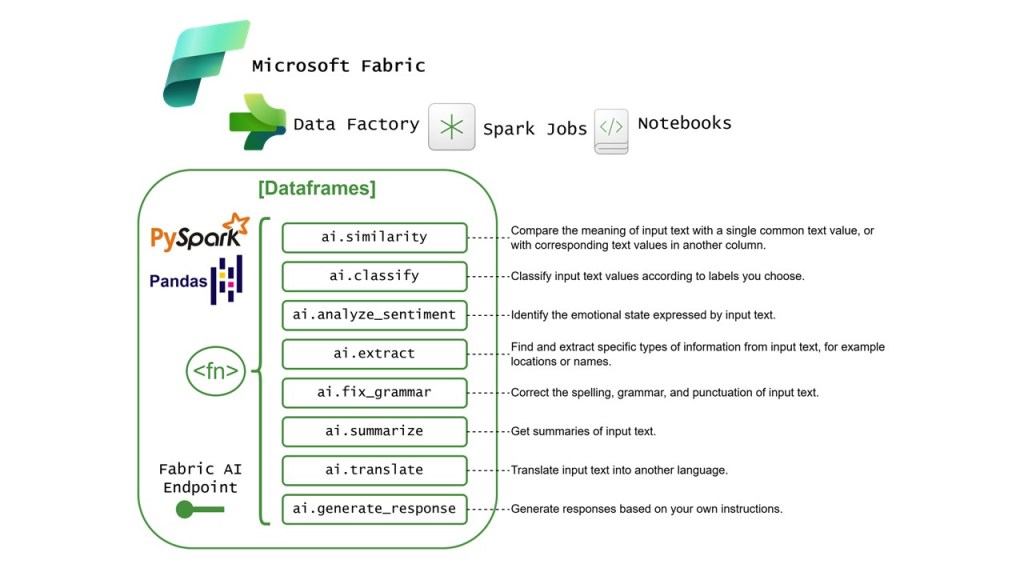
What AI Functions Are
AI Functions apply LLM-powered transformations to pandas or PySpark DataFrames with one line of code. You don’t set up endpoints, write prompt plumbing, or manage batching. Fabric handles the built-in model endpoint, and the functions process up to 200 rows at a time by default. You can tune that number for your workload.
The Function Lineup
| Function | What it does |
|---|---|
ai.analyze_sentiment | Labels text as positive, negative, mixed, or neutral, or with your own labels |
ai.classify | Sorts text into categories you define |
ai.embed | Turns text into vector embeddings for search, retrieval, and ML |
ai.extract | Pulls out entities like names, locations, or custom fields |
ai.fix_grammar | Corrects spelling, grammar, and punctuation |
ai.generate_response | Runs your own prompt against each row |
ai.similarity | Scores how close two texts are in meaning, from -1 to 1 |
ai.summarize | Summarizes text, files, a column, or a whole row |
ai.translate | Translates text into another language |
ai.embed and ai.similarity are the biggest additions for data engineers. They let you do semantic matching and deduplication directly in a DataFrame, without standing up a separate vector pipeline.
Beyond Notebooks: SQL and Dataflow Gen2
AI Functions are no longer just for Python users.
- Notebooks: The pandas and PySpark APIs remain the most flexible option.
- Warehouse and SQL analytics endpoint: SQL-style functions such as
ai_summarize,ai_classify, andai_generate_responserun directly inside T-SQL queries. Analysts who live in SQL can now enrich data without switching tools. - Dataflow Gen2: The Fabric AI Prompt feature adds AI-generated columns in Power Query, which brings these features to low-code users.
All three use the same base model, so results are consistent no matter where you call it from.

Multimodal: Images, PDFs, and Files
This is the change I find most useful in practice. AI Functions can now work with files as well as text values. Supported types include JPG, PNG, static GIF, WebP, PDF, and many text formats (MD, TXT, CSV, TSV, JSON, XML, PY, and more).
That opens up some practical scenarios:
- Summarizing a folder of PDF contracts
- Classifying product images
- Extracting invoice fields from scanned documents
- Generating responses based on the content of a file
To pass file paths instead of text, set column_type="path" in pandas, or use input_col_type or col_types in PySpark. There are also helper functions for this:
aifunc.loadreads a folder of files into a structured table, guided by a prompt or schema.aifunc.list_file_pathslists the files in a folder so you can feed them to any AI function.ai.infer_schemalooks at file contents and proposes an extraction schema forai.extract.
Prerequisites
Before you start, check these:
- Your admin must enable the tenant switch for Copilot and other Azure OpenAI-powered features. Depending on your region, you might also need to enable cross-geo processing.
- You need a paid Fabric capacity: F2 or higher, or any P SKU.
- You need Fabric Runtime 1.3 or later.
Models and Providers
The Python functions now default to gpt-5-mini with reasoning_effort set to low. That model has a 400K-token context window and can output up to 128K tokens.
You’re not locked into the default. The pandas and PySpark functions can use any LLM that supports the chat_completions or responses API. That includes Azure OpenAI deployments and Microsoft Foundry models like Qwen, Kimi, Grok, LLaMA, and Mistral.
Two notes from the docs: the functions work best on English text, and Fabric doesn’t log or store your prompts, inputs, or outputs.
Getting Started
In a PySpark runtime, most usage needs no installation. In a pure Python runtime, you install the synapseml_internal and synapseml_core wheels. You only need the openai package (version 1.99.5 or later) if you want SDK-native client behavior or Pydantic response formats.
For pandas:
python
import synapse.ml.aifunc as aifuncimport pandas as pdtickets = pd.DataFrame({ "ticket": [ "My order arrived two weeks late and the box was crushed.", "Love the new dashboard layout, much easier to find reports.", "Can't log in since the update, password reset isn't working." ]})tickets["sentiment"] = tickets["ticket"].ai.analyze_sentiment()tickets["team"] = tickets["ticket"].ai.classify("shipping", "product", "account access", "other")tickets["spanish"] = tickets["ticket"].ai.translate("spanish")display(tickets)
For PySpark:
python
from synapse.ml.spark.aifunc.DataFrameExtensions import AIFunctionsenriched = ( reviews_df .ai.summarize(input_col="review_text", output_col="summary") .ai.classify( labels=["service", "cleanliness", "location", "other"], input_col="summary", output_col="category", ))display(enriched)
That second example shows a newer feature. PySpark AI Functions return DataFrames that keep the .ai accessor, so you can chain transformations without saving intermediate results. Here, the example summarizes each review and then classifies the summary.
Structured Output
Free-text output is fine for exploration, but pipelines need structure. Two features help here:
ExtractLabelinai.extractsupports JSON Schema features like typed fields, enums, arrays, nested objects, nullable values, and required properties.response_formatinai.generate_responseaccepts JSON objects, JSON Schema, or Pydantic models.
ai.summarize also takes an instructions parameter, so you can control tone, length, audience, or focus.
Monitoring Cost and Quality
This is where the feature has matured the most. Running LLM calls over millions of rows needs guardrails, and there are now real ones.
ai.stats works on any AI-generated Series or DataFrame. It reports:
- How many rows succeeded, failed, or were skipped
- How many rows were blocked by the content filter
- Input, output, cached, and reasoning token counts
- Which model was used
Rows that hit capacity limits come back as aifunc.CapacityExceededResult. In pandas, aifunc.split_results separates successful rows from failed ones so you can retry the failures later.
For cost tracking, pandas can show token counts and capacity unit estimates while it runs with progress_bar_mode="stats". On the capacity side, the Fabric Capacity Metrics app reports this usage under an operation called AI Functions, which makes chargeback much easier.
Evaluate Before You Ship
Microsoft now publishes two sets of notebooks. The Starter Notebooks have end-to-end pandas and PySpark examples. The Eval Notebooks help you check output quality before you put a function into production. Every code sample in the docs carries a reminder that the code uses AI and the output should be reviewed. Take that seriously, and run the eval notebooks against a sample of your own data before building downstream reports on AI-generated columns.
Bottom Line
The original promise was one line of code for generative AI in your DataFrames. The 2026 version keeps that, and adds:
- Support for SQL and low-code users
- Documents and images as input
- Your choice of model
- The monitoring you need to run it responsibly at scale
If you tried AI Functions early and moved on, they’re worth another look.
Reference: AI Functions: Transform data at scale with AI – Microsoft Learn





Leave a Reply