
Azure AI Foundry now Microsoft Foundry
This post originally covered the Azure AI Foundry extension for VS Code (May 2025). A lot has changed since then, so I’ve rewritten it.
Updated Date:
When I first wrote about Azure AI Foundry in VS Code, the pitch was simple: templates, a model playground, and fewer trips to the portal. That’s still true, but the tooling has grown a lot and been consolidated.
The short version: Azure AI Foundry is now Microsoft Foundry. The AI Toolkit extension has been renamed Foundry Toolkit. It also absorbed everything the separate Foundry extension used to do. You now install one extension, and it covers both local development and your cloud Foundry resources.

What it’s for
Foundry Toolkit covers the whole lifecycle of an AI app or agent: build, test, deploy, evaluate, and monitor. You can work entirely locally, or connect to a Foundry project and manage cloud resources without leaving the editor.
It fits a range of people:
- App developers adding generative AI to web, desktop, or mobile apps.
- AI/ML engineers comparing, tuning, and deploying models and agents.
- Data scientists experimenting with prompts, datasets, and evaluation criteria.
- Learners exploring concepts with playgrounds and local models.
How it’s laid out
The extension separates what you have from what you can do:
| Section | What you’ll find there |
|---|---|
| My Resources | Your models, agents, tools, knowledge sources, and evaluations, both local and in your Foundry project |
| Developer Tools | Model and tool discovery, plus build, debug, deploy, test, evaluate, and monitor workflows |
| Help and Feedback | Copilot help, docs, release notes, issue reporting, and community links |
Features move quickly here. Treat the Toolkit view in your installed version as the source of truth.
Models: from catalog to local deployment
This is where the old “playground” story has grown the most:
- Model Catalog: browse models from Foundry and other providers. You can also run models locally through ONNX, Ollama, or Foundry Local.
- Model Playground: compare models side by side and test prompts, parameters, images, and attachments.
- Optimization: convert, quantize, optimize, and evaluate supported models for local Windows deployment.
- Fine-tuning: fine-tune locally on a GPU, or remotely using Azure Container Apps.
- Profiling: track CPU, GPU, and NPU usage for supported Windows ML workloads.
Agents: the biggest addition
The original extension didn’t do much for agents. Foundry Toolkit does. It supports both prompt-based agents and code-based hosted agents:
- Agent Builder: set up instructions, model, variables, structured outputs, and tools with no code project required.
- Tool Catalog: find Foundry tools, MCP servers, and toolboxes, and attach them to your agents.
- Hosted agent scaffolding: generate a project when you need custom code, a specific framework, or your own orchestration logic.
- Agent Inspector: debug local agents. You can watch streaming responses and tool calls and see how a workflow executes.
- Deploy and test: push hosted agents to Foundry Agent Service from source or a container image. Then test them in the Hosted Agent Playground, check logs and traces, and manage versions.
- Evaluation: score models, prompts, and agents using datasets, built-in evaluators, or your own criteria.
Some of these are still in preview. The Foundry Toolkit changelog has the current status.
Connecting to your Foundry project
Sign in to Azure, pick a Foundry project, and you can do most day-to-day cloud work from VS Code:
- Browse projects and resources.
- Deploy models from the catalog.
- Grab endpoints and auth details.
- Create, deploy, test, and version agents and workflows.
- Review tools, knowledge sources, evaluations, conversations, logs, and traces.
Where does the editor stop? Use the Foundry portal for broader administration. When a workflow needs to run inside your application, use the Microsoft Foundry SDKs.
The part that hasn’t changed: plan for model churn
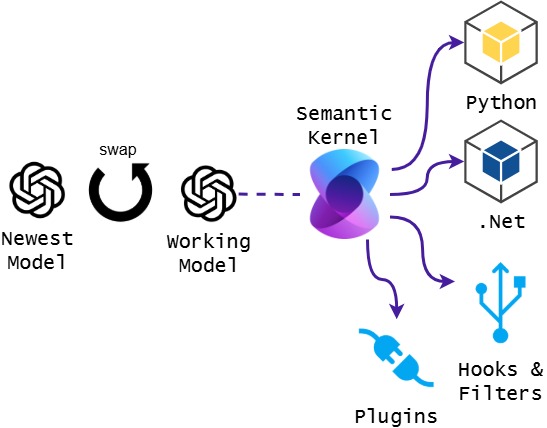
My main point from the original post still holds, and it matters more now. New models ship constantly, so your code shouldn’t be tied to any one of them.
Keep the model behind an abstraction. Your agent logic, tools, filters, and plugins should stay put when you swap the model underneath. Frameworks are built for this. (Semantic Kernel was my example last time; check Microsoft’s current guidance on the Microsoft Agent Framework, which is positioned as its successor.) Foundry Toolkit’s side-by-side comparisons and built-in evaluations make each swap safer. You can test a new model against your own datasets before promoting it, instead of trusting a leaderboard.
Getting started
- Install Foundry Toolkit for VS Code
- Set up a Foundry project in VS Code
- Choose how to build with Microsoft Foundry
- Foundry Toolkit overview (Microsoft Learn)



Leave a Reply