
Originally published as “Azure AI Foundry.”
Updated Date:
Originally published:
What changed since the original post
When I first wrote this post, Microsoft called the platform Azure AI Foundry and the services in it “Azure AI services” (and before that, Cognitive Services). The platform is now just Foundry, and the prebuilt, API-driven services in it are called Foundry Tools. The idea hasn’t changed: you get ready-to-use AI capabilities through APIs, without building or training models yourself. But the lineup and the guidance around it have changed, so this post is due for a refresh.
How I use Foundry Tools in my projects
I use Foundry Tools in my AI projects to quickly add ready-to-use, fully managed capabilities like vision, speech, and document processing without building complex machine learning models from scratch. The prebuilt APIs cover the tasks that come up again and again in client work: Vision, Speech, Language, Translator, Content Understanding, and Document Intelligence. That lets me spend my time on the data and the business problem instead of on model training. They also lower the barrier to entry. Teams can build intelligent apps and agents faster with out-of-the-box APIs that need far less machine learning expertise than custom model training. Because the tools are fully managed on Microsoft’s cloud infrastructure, performance scales as usage grows, and I don’t have to plan for that capacity myself. Finally, they fit into the broader Microsoft Foundry environment alongside the model catalog, safety filters, and enterprise governance. So a solution that starts with one API call can grow into a governed, production-ready platform without switching tools.
What Foundry Tools are
Foundry Tools are cloud-hosted AI services. They let developers add capabilities like speech, vision, language understanding, translation, and search to their applications without needing deep data science expertise. Some tools work out of the box. Others let you customize the model with your own data. Most are available through REST APIs and client SDKs for common languages such as C#, Java, Python, and JavaScript. You can also try many of them, including Azure OpenAI, Content Safety, Speech, and Vision, directly in the Foundry portal at ai.azure.com.
Where Azure OpenAI fits
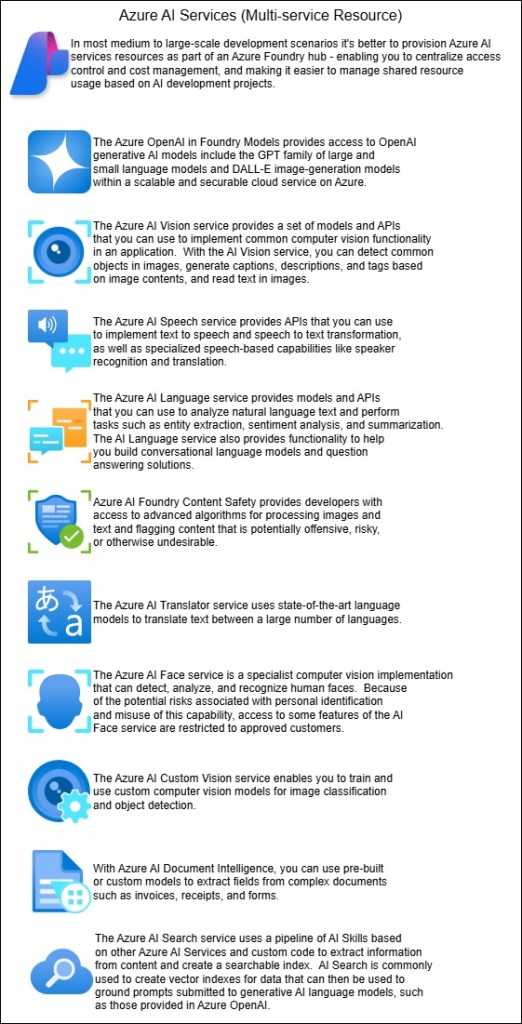
Azure OpenAI is still the generative AI centerpiece of Foundry, and Microsoft groups it with the Foundry Tools you can try in the portal. The practical pattern hasn’t changed. Azure OpenAI handles reasoning and generation. The specialized tools below handle work that is narrower but needs to be very accurate: transcribing audio, extracting fields from invoices, detecting harmful content, or searching your enterprise data. Most production solutions I see combine the two.
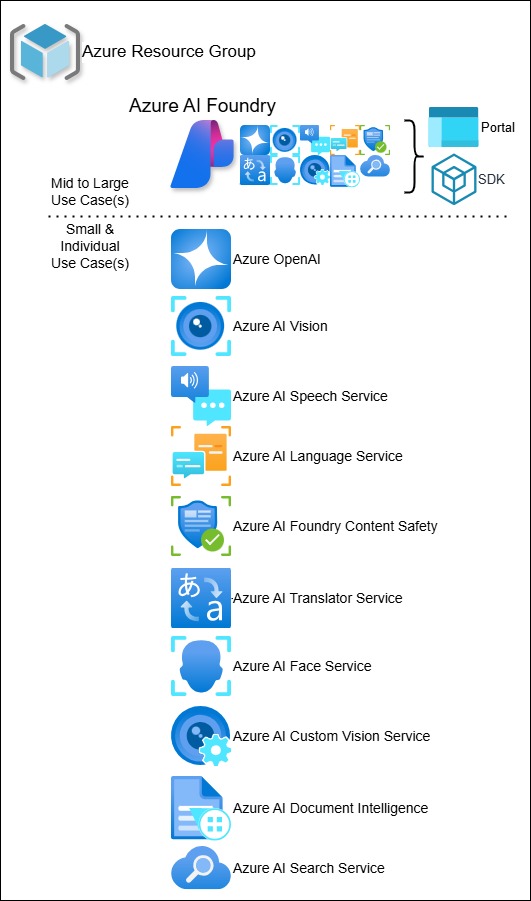
The current Foundry Tools lineup
| Tool | What it does |
|---|---|
| Speech | Converts speech to text and text to speech, translates speech, and recognizes speakers |
| Translator | Translates across more than 100 languages and dialects, including at-risk and endangered ones |
| Language | Provides natural language understanding for text-based apps |
| Content Understanding (new) | Analyzes content across multiple media types |
| Document Intelligence | Extracts structured data from documents |
| Vision | Analyzes images and video |
| Azure AI Search | Adds AI-powered search to web and mobile apps; this is the retrieval backbone of most RAG solutions |
| Content Safety | Detects harmful or unwanted content |
| Custom Vision | Trains image recognition models on your own labeled images |
| Immersive Reader (new to this list) | Helps users read and understand text |
A note on Face: my original post included Azure AI Face. It isn’t on the current Foundry Tools overview page, so check the Face documentation directly for its current status before you plan around it.
Retired services: don’t start new projects on these
Microsoft has scheduled the following services for retirement. Existing apps can still use them, but new builds shouldn’t:
- Anomaly Detector
- Content Moderator (use Content Safety instead)
- Language Understanding (LUIS) (use Language instead)
- Metrics Advisor
- Personalizer
- QnA Maker (use Language instead)
If any of your older solutions still depend on these, add a migration to your roadmap now.
Pricing basics
Billing is based on transactions. Each pricing tier sets three things:
- a cap on transactions per second
- which features are included
- a cost for a set number of transactions, with overage charges beyond that
Many tools also have a free tier. Select the F0 SKU when you create the resource, and it’s a cheap way to prototype before committing.
How you build with Foundry Tools
- Client libraries and REST APIs. These are the most flexible option. You can call the services from almost any language or environment, and many tools let you customize models programmatically. They’re best suited to developers and data scientists.
- CI/CD with Azure DevOps and GitHub Actions. Use these for automated training, testing, and release of custom models. Speech has documented CI/CD patterns for this.
- On-premises containers. Many tools can run in Docker containers. This puts the AI next to your data when compliance, security, or latency require it.
- Custom training. Some tools let you bring your own labeled data to extend the base model. For example, you could train Custom Vision to recognize specific product defects from tagged images.
The broader ecosystem
This is where the data engineering side comes in. Foundry Tools connect to:
- Logic Apps and Power Automate for workflow automation
- Azure Functions and App Service for deployment
- Databricks, Synapse, Apache Spark, and AKS for big data scenarios
In practice, that means you can run Document Intelligence or Language inside a pipeline, not just in an app.
Security and compliance
Foundry Tools use layered security:
- Authentication: Microsoft Entra ID or resource keys (use Entra ID where you can)
- Network isolation: Azure Virtual Network support
On compliance, the certifications include CSA STAR, FedRAMP Moderate, and HIPAA BAA, which matters for healthcare and public sector work. Regional and language availability varies by tool, so check both before you commit to an architecture.
Bottom line
The name changed, but the value is the same: prebuilt AI capabilities that let teams ship without training everything from scratch. The biggest update since my last post is the cleanup. Legacy services are being retired, newer tools like Content Understanding have been added, and everything now sits under one Foundry portal. If you built on the old Cognitive Services, now is a good time to review which services you depend on.
Source: Microsoft Learn, “What are Foundry Tools?”




Leave a Reply