
Updated Date:
Originally published July 7, 2025 as “Deployment Strategies: Optimizing Azure AI Foundry Models for Cost, Performance, and Scale.” Azure AI Foundry is now Microsoft Foundry, and the deployment options have been updated.
Don’t let AI become another IT cost center.
Choosing a model is only half the job. How you deploy it decides what you pay, how consistent latency is, and where your data is processed. This guide covers the current deployment types, gives you a table for choosing among them, and lists the levers that often save more than switching SKUs.

What changed since Foundry started?
- Rename: Azure AI Foundry is now Microsoft Foundry.
- More deployment types: Originally there were 3 deployment options. Now there are 9 serverless deployment types, plus a Developer tier for fine-tuned model evaluation.
- Instant access (preview): You can call supported models by name with no deployment at all.
- Priority processing: Global Standard and Data Zone Standard support faster response times on a pay-as-you-go basis.
Think in 2 dimensions for deployments: mode and scope
Every deployment type is a combination of two choices. Mode decides how you pay and how predictable performance is
- Standard: pay-per-token, best-effort performance.
- Provisioned: reserved capacity bought in provisioned throughput units (PTUs), with guaranteed throughput and lower latency variance.
- Batch: asynchronous processing at a 50% discount with a 24-hour target turnaround.
Scope decides where inference is processed:
| Scope/Mode | Standard | Provisioned | Batch |
| Global | Global Standard | Global Provisioned | Global Batch |
| Data Zone | Data Zone Standard | Data Zone Provisioned | Data Zone Batch |
| Regional | Standard | Regional Provisioned | Not available |
One point is easy to miss: data at rest stays in your designated Azure geography for every deployment type. Scope only changes where prompts and responses are processed during inference.
Decision table
Start with Global Standard. Per Microsoft’s guidance, it gets new models first, has the lowest price, and has the broadest region coverage. Move only when you have a specific reason.
| Situation | Use | Trade-off |
| Prototyping or trying a new model | Instant access (preview) | No deployment to manage, but not a production path |
| Default for most workloads | Global Standard | Latency can vary at high sustained volume |
| Burst or unpredictable traffic | Global Standard or Standard | Best-effort performance, no reserved capacity |
| Steady, high-volume, latency-sensitive | Global Provisioned | You pay for reserved PTUs whether or not you use them |
| Data must be processed in the US, EU, or APAC | Data Zone Standard | Narrower routing than Global |
| Data zone requirement plus predictable throughput | Data Zone Provisioned | Reserved capacity plus zone restrictions |
| Data must stay in one Azure geography | Standard or Regional Provisioned | Smaller quote, later model availability |
| Large jobs that can wait up to 24 hours | Global Batch or Data Zone Batch | 50% cheaper, but no real-time SLA |
| Evaluating a fine-tuned model | Developer | 24-hour lifetime, no SLA, no data residency guarantee |
Two caveats apply. Not all models support all deployment types, so check the model availability matrix for your model and region. New deployment types also arrive in a set order: Global first, then Data Zone, then geography-based, which arrives last with no guaranteed date.

Cost: where the real savings are
1. Move async work to Batch. Content generation, document summarization, classification and extraction over large datasets rarely need instant answers. Global and Data Zone Batch cut cost by 50% and use a separate enqueued token quota, so batch jobs don’t crowd out your online workloads. Batch targets completion within 24 hours but may take longer, so build retries and monitoring into your pipeline.
2. Don’t buy PTUs on a guess. Provisioned capacity is worth it when volume is sustained and latency consistency matters. Before committing:
- Run pay-as-you-go long enough to see real usage patterns.
- Measure peak hourly throughput, not just monthly totals.
- Check the current minimum PTUs for your model in the provisioned throughput docs, since they vary by model.
- Consider reservation discounts only once usage is proven.
- For customer-facing apps on provisioned capacity, look into spillover to standard capacity for overflow. [Verify current support and any limits before recommending it.]
3. Use the levers outside deployment type. These often beat SKU changes:
- Prompt caching: keep system prompts and shared context identical across requests.
- Model routing: send classification, extraction and routing tasks to smaller models, and save flagship models for hard cases.
- Output discipline: cap output tokens and ask for structured, concise responses.
4. Don’t pay for scope you don’t need. Data Zone and Regional types typically cost more than Global and have smaller quotas. Use them when compliance requires it, not by default. Check the pricing page for current differences.
Performance and scale
Global Standard scales easily but has variable latency at volume. It offers the highest default quota and removes the need to load balance across multiple resources. But Microsoft notes that customers with high consistent volume may see greater latency variability, with the threshold set per model.
Provisioned is the fix for latency variance. Reserved PTUs give lower and more consistent latency, which matters for chatbots, copilots and other user-facing paths.
Plan for regional interruptions. With Global Standard and Data Zone Standard, an interruption in the primary region affects all traffic initially routed there. Review the high availability guide and decide whether a second deployment or resource is warranted.
Watch quota. Standard deployments consume tokens-per-minute quota. Check quotas and limits before launch, not after your first 429 error.
Data residency and governance
- Global: processed in any Azure region where the model is deployed.
- Data Zone: processed only within the US, EU (following the Azure EU Data Boundary, which can include EFTA countries such as Norway and Switzerland), or APAC. Microsoft can add regions to a zone without prior notice.
- Standard and Regional Provisioned: processed within your chosen Azure geography, and possibly between regions in that geography for operational purposes.
To enforce these choices across your organization, use Azure Policy to block specific SKUs. For example, denying GlobalStandard forces teams onto data-zone or regional deployments. Microsoft provides a sample policy definition on the deployment types page.
An illustrative deployment mix
This is a hypothetical example, not a benchmark. Imagine a customer-support platform:
- Live chat assistant (steady, latency-sensitive): Data Zone Provisioned, because the customers are in the EU and latency consistency matters.
- Internal tools and experiments (bursty, low volume): Global Standard.
- Nightly ticket summarization and sentiment tagging: Data Zone Batch, with a 50% discount and no urgency.
- Fine-tuned model evaluation: Developer tier, disposable after 24 hours.
The point is that each workload gets the cheapest option that meets its requirements, rather than one deployment type for everything.
What this guide doesn’t cover
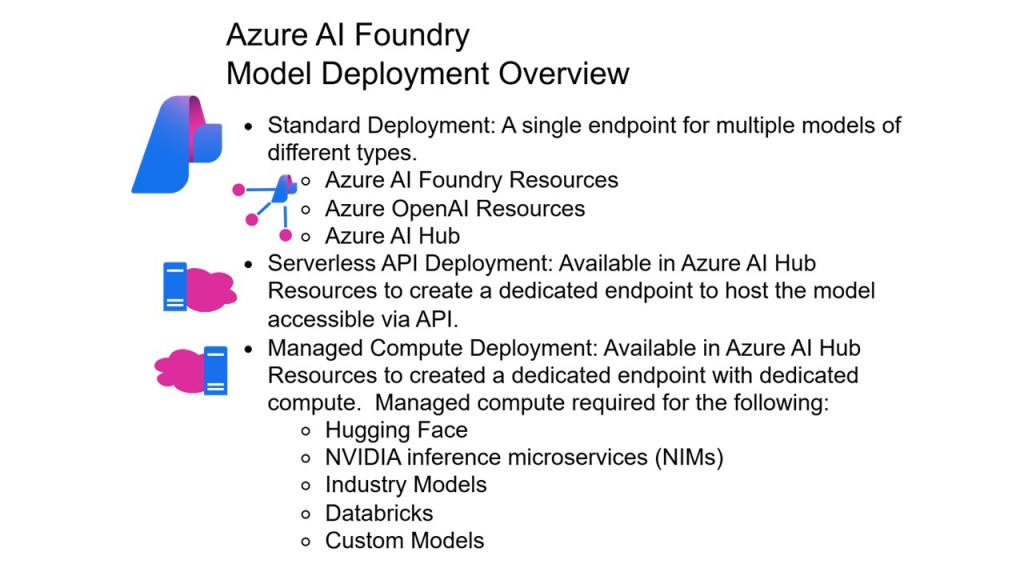
These deployment types apply to the serverless API option. Open-source and custom models on managed compute use different deployment and billing mechanics. See the deployment overview for how the options differ.
What to measure
Once deployed, track:
- Utilization of provisioned capacity (idle PTUs are wasted spend).
- Throttling (429) rates per deployment.
- P95 latency for user-facing paths.
- Cost per workload, using tags in Azure Cost Management.
- Batch completion times, to confirm the 24-hour target is holding.
Your next three steps
- Tag every AI workload by latency tolerance, volume pattern and data residency need.
- Move async workloads to Batch for the fastest savings.
- Measure before you reserve: buy PTUs only after your usage data justifies them.
Sources: Understanding deployment types in Microsoft Foundry Models (Microsoft Learn, updated August 12, 2026); Azure OpenAI Service pricing.






Leave a Reply