
Creating Topics in Microsoft Copilot Studio is vital for structuring knowledge and enhancing AI-driven productivity. By organizing information into clearly defined categories, Topics help streamline workflows and ensure consistency across various applications. This approach not only improves accessibility but also enables AI Agents to draw meaningful connections, delivering more accurate and context-aware responses. Well-crafted Topics serve as a framework for collaboration and innovation, empowering users to harness AI capabilities to their fullest potential.
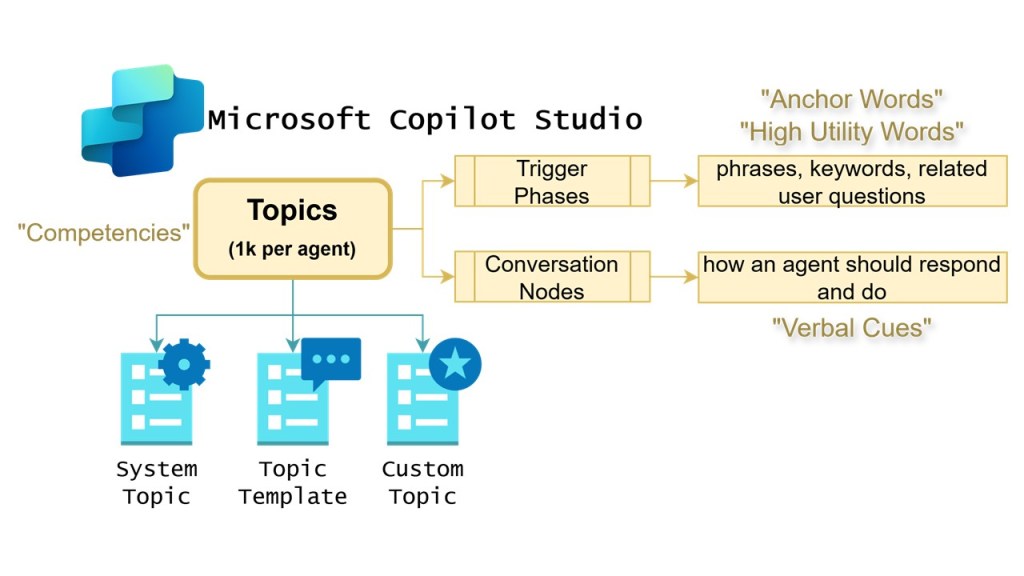
“Anchor words” are key terms or phrases that serve as reference points within a text, helping AI navigate and comprehend the material more effectively. In prompt contexts, these words often act as cognitive signals, aiding AI Agents in locating essential ideas or reorienting themselves when focus is lost. By anchoring attention, they facilitate better retention and understanding
“High Utility Words” are frequently occurring terms that hold significant importance for comprehension across various texts and contexts. In AI Agents, these words play a crucial role in building foundational literacy as they often appear in everyday communication and academic material. Their repeated exposure helps AI Agents recognize patterns, decode language more efficiently, and enhance overall fluency, making them indispensable in the process of strengthening prompts.
“Verbal cues” are prompts or signals that guide an AI Agents focus and understanding during the prompt process. These cues can take the form of questions, reminders, or emphatic statements that highlight critical information or clarify ambiguous elements in a text. By providing reinforcement, verbal cues support cognitive engagement, helping AI Agents focus their attention and bridge gaps in comprehension. Cues are invaluable tools in fostering participation and bolstering confidence in decoding and interpreting prompts.
 Ross McNeely
Leave a comment